Picking an Engine
I’m prototyping a game. Before I write a line of it, I have to decide what it runs on.
The shortlist came down to three: Ironwail, FTEQW and Godot. Two of those are Quake engines, which tells you most of what you need to know about the look I’m after.
Ironwail. A Quake source port, forked from QuakeSpasm and built to run vanilla Quake fast and faithfully. It is very good at being Quake. That’s also the problem. It’s made for playing Quake and its mods, not for building something that isn’t Quake. New game logic goes through QuakeC, and anything the original engine didn’t do, I’d be doing in C inside someone else’s codebase.
FTEQW. The opposite philosophy. FTE has spent decades adding everything: client-side QuakeC, modern rendering, support for half the map and model formats out there. People have shipped standalone games on it. The catch is the documentation, which is mostly a wiki, old forum threads and a Discord full of people who already know the answer.
Both have a pull I can’t fake. The movement, the lighting, the chunky geometry and the low-res textures come for free. Open TrenchBroom, build a room, compile it, and it already feels like 1996. That feeling is the reason this shortlist exists.
The same pickup, three ways
The real difference shows up in the code. Here’s a health pickup in QuakeC, simplified from the way Quake’s own works:
void() item_health_touch =
{
    if (other.classname != "player")
        return;
    if (other.health >= other.max_health)
        return;

    other.health = other.health + 25;
    sprint(other, "You got 25 health\n");
    sound(other, CHAN_ITEM, "items/health1.wav", 1, ATTN_NORM);
    remove(self);
};

void() item_health =
{
    precache_model("maps/b_bh25.bsp");
    precache_sound("items/health1.wav");
    setmodel(self, "maps/b_bh25.bsp");
    setsize(self, '0 0 0', '32 32 56');
    self.solid = SOLID_TRIGGER;
    self.touch = item_health_touch;
};
It reads like C, but it isn’t. Vanilla QuakeC has five types: float, vector, string, entity and function. No integers, no arrays, no structs. There’s one kind of entity, and every field you declare exists on every entity in the game, so a health pack technically has a max_health and a door technically has an ammo_shells. Who touched what arrives in two globals, self and other. Timers are self.nextthink = time + 0.5; self.think = some_function;. The whole game compiles to a single progs.dat that the engine runs in a little virtual machine.
There’s a real charm to it. It’s small enough to hold in your head, and you can read the entire game logic of Quake in a weekend. FTE’s compiler, FTEQCC, adds integers, arrays and something like classes, but then you’re writing FTE’s dialect and you’re married to FTE.
The same pickup in Godot, in C#:
using Godot;

public partial class HealthPickup : Area3D
{
    [Export] public int Amount = 25;

    public override void _Ready()
    {
        BodyEntered += OnBodyEntered;
    }

    private void OnBodyEntered(Node3D body)
    {
        if (body is not Player player || player.Health >= player.MaxHealth)
            return;

        player.Heal(Amount);
        QueueFree();
    }
}
And in GDScript, Godot’s own language:
extends Area3D

@export var amount := 25

func _ready() -> void:
    body_entered.connect(_on_body_entered)

func _on_body_entered(body: Node3D) -> void:
    if body is Player and body.health < body.max_health:
        body.heal(amount)
        queue_free()
Same idea, different world. The pickup is its own class. It only knows about health because the player does, not because every object in the game carries a health field. [Export] puts Amount in the editor, so a small pickup and a big one are the same script with a different number. And when something breaks, I get a breakpoint and a call stack instead of a dprint and a squint at the console.
| QuakeC | C# in Godot | |
|---|---|---|
| Types | float, vector, string, entity, function | all of .NET |
| Structure | one entity type, every field on every entity | classes, nodes and scenes |
| Debugging | mostly print statements | breakpoints in a real IDE |
| Runs as | bytecode in the engine’s VM | compiled .NET |
Why Godot
No built-in vibe at all. Out of the box it looks like any other modern engine. But:
- It’s a tool for making games, not for running one. Scenes, nodes, an editor, a debugger, and export to every platform in a couple of clicks. Everything I’d have to build or bolt onto a Quake engine is already there.
- I don’t have to give up TrenchBroom. The func_godot plugin reads TrenchBroom maps straight into Godot, brushes and entities included. You define an entity like
item_healthonce, it shows up in TrenchBroom’s entity list, and when the map is built it spawns the scene with the script above. The part of the Quake workflow I actually love comes with me. - C# or GDScript. I’ve written a lot of C# by now. Godot lets me keep using it, or drop into GDScript when I just want to try something.
- MIT licence. Free, no royalties, nobody to ask.
Getting the look back
The look is a solvable problem, and there’s more than one way to solve it. Here’s one example, a few lines in project.godot:
[display]
window/size/viewport_width=320
window/size/viewport_height=240
window/size/window_width_override=1280
window/size/window_height_override=960
window/stretch/mode="viewport"
That renders the whole game at 320 by 240 and scales it up four times, chunky pixels included. It isn’t the only way. For a game jam at work, I got the effect with a pixel shader in Godot instead, and that game won the jam.
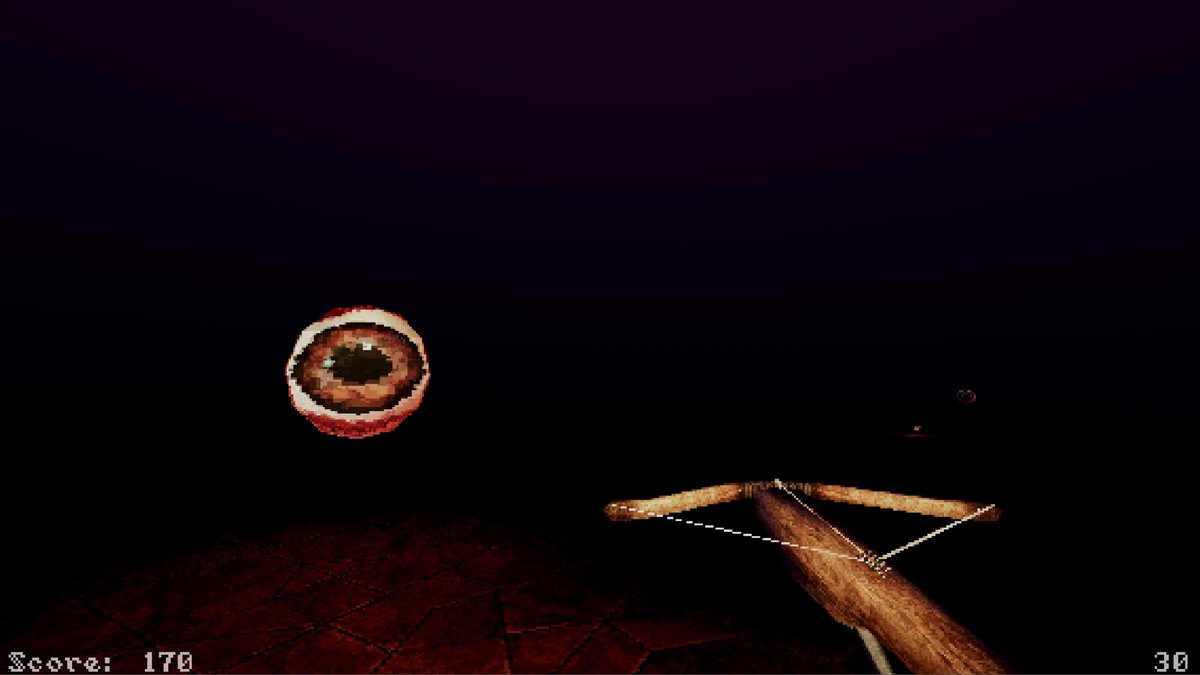
From the game jam. The pixelation is a shader.
Whichever way you go, set texture filtering to nearest on the materials so the textures stay crisp instead of smeared, and the rest is taste: low-res textures, a limited palette, and baked lighting. Faking 1996 is a well-trodden path. Faking a modern editor on top of a Quake engine is not.
I’ve poked at Godot before, back when I was collecting unfinished projects across every engine I could download. The difference this time is that I’m choosing it for a reason instead of because it was next on the list.
The honest trade: with Ironwail or FTE I’d start with the feel and fight the tools. With Godot I start with the tools and have to earn the feel. For a prototype, where the whole point is changing things quickly, that’s the right way round.
Next up: a TrenchBroom map running in Godot, with something in it that moves the way it should.